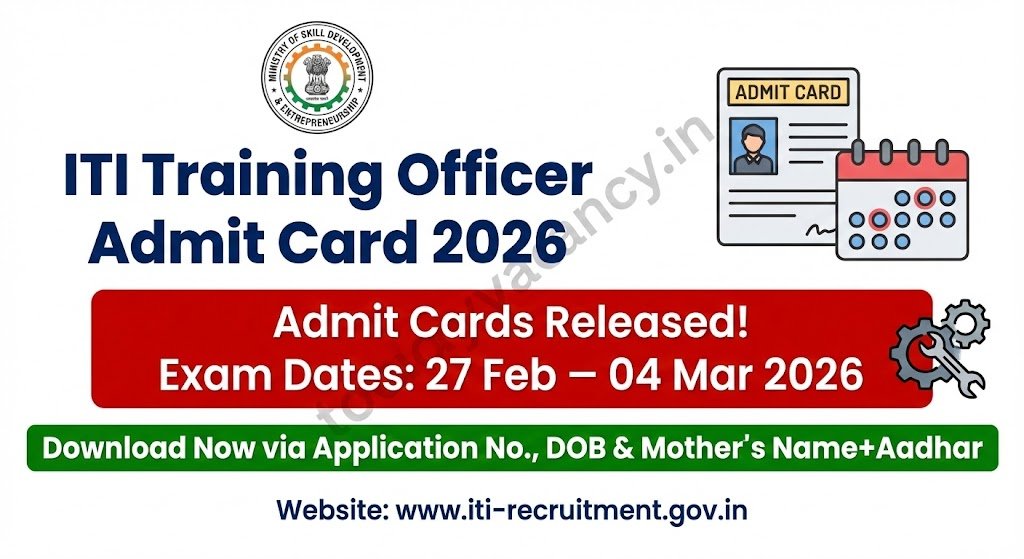

The Ministry of Skill Development & Entrepreneurship has released the admit cards for the ITI Training Officer Recruitment Test 2026. Candidates who cleared the online application phase can now generate their personalized admit cards to appear for the computer‑based examination. With multiple trade‑specific papers scheduled from 27 February 2026 to 04 March 2026, the portal is buzzing with activity. This news‑style brief outlines the exact steps to obtain the admit card, the essential details printed on it, and the key dates you must remember before heading to the test centre.
Recruitment/Exam Overview
| Feature | Details |
|---|---|
| Department/Board | ITI Training Officer Recruitment (Central) |
| Post Name | Training Officer (ITI) |
| Exam Name | ITI Training Officer Recruitment Test 2026 |
| Total Vacancy | Details to be updated soon |
| Category | Admit Card |
| Application Mode | Online |
| State | All India (pan‑India) |
Important Dates
| Event | Date |
|---|---|
| Admit Card Generation Opens | 10 February 2026 |
| Last Day to Download Admit Card | 25 February 2026 |
| Exam Date – Paper O (Carpenter) | 27 February 2026 (First Shift) |
| Exam Date – Paper P (Mechanic Tractor) | 27 February 2026 (Second Shift) |
| Exam Date – Paper M (Sewing Technology) | 28 February 2026 (Second Shift) |
| Exam Date – Paper V (Office Assistant & Computer Operator) | 28 February 2026 (First Shift) |
| Exam Date – Paper T (Basic Cosmetology) | 27 February 2026 (First Shift) |
| Exam Date – Paper Z (English Secretary) | 28 February 2026 (Second Shift) |
| Remaining Papers (A‑Z except those listed) | 01 – 04 March 2026 (as per individual paper schedule) |
Note: All dates are mentioned in DD/MM/YYYY format. Verify the exact shift (First/Second) for your paper on the official admit card.
What the Admit Card Contains?
- Application Number: 13‑digit unique ID (e.g., 2026001234567).
- Date of Birth: DD/MM/YYYY as per your application.
- Mother’s Name + Aadhar Digits: First two letters of your mother’s name concatenated with the last four digits of your Aadhaar (e.g., SA1234).
- Selected Subject/Paper Code: The trade you applied for (A, AA, AB … Z).
- Exam Date & Shift: Exact day and whether you are allotted the First or Second shift.
- Venue Details: Centre name, address, and room number.
- Photograph & Signature: Embedded as per the uploaded files.
- Important Instructions: Carry a valid photo ID, the original admit card, and a self‑attested copy of your highest qualification.
How to Download Your Admit Card?
Follow these six quick steps to retrieve the PDF from the official portal.
- Open the Official Recruitment Site – Go to http://esb.mp.gov.in/e_default.html (the official portal for the 2026 test).
- Navigate to “Admit Card” – On the homepage, locate the “Admit Card” tab under the Latest Updates banner.
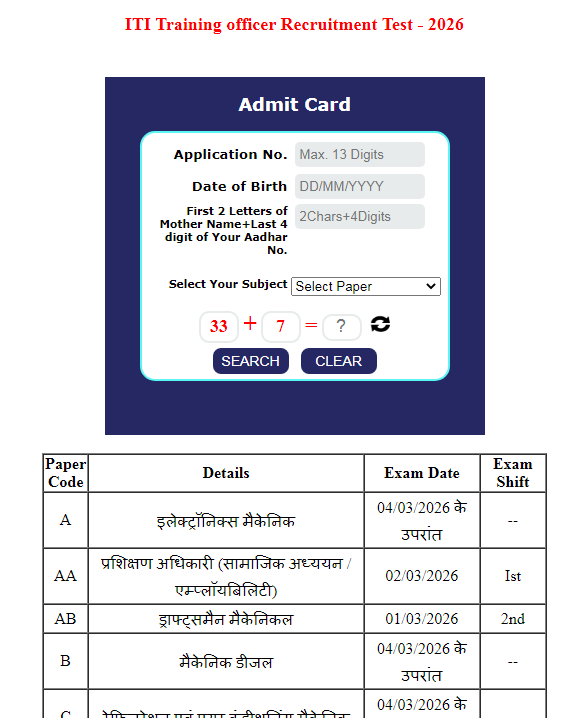
- Enter Required Credentials – Fill in:
- Application No. (13‑digit)
- Date of Birth (DD/MM/YYYY)
- Mother’s Name + Aadhar Digits (e.g., SA1234).
- Solve the CAPTCHA – A simple arithmetic problem (e.g., 33 + 7 = ?) appears. Input the correct answer to prove you are human.
- Select Your Paper – Use the drop‑down menu to choose the exact paper code you applied for (A, AA, AB … Z).
- Download & Print – Click “Generate Admit Card”. The PDF opens in a new tab—download it, print a clear hard copy, and keep a digital copy for reference.
Pro tip: Verify every entry (especially your name spelling and paper code) before printing. Any mismatch can lead to disqualification at the test centre.


Important Links
| Link Name | Direct Link |
|---|---|
| Download Admit Card | Download Admit Card |
| See Notification | See Notification |
| Official Website | Visit |
| Join WhatsApp Group | Join Now |
| Join Telegram Channel | Join Now |
Conclusion
The ITI Training Officer Admit Card for 2026 is now live. Candidates must download, verify, and print the document before the stipulated deadline to avoid last‑minute hassles. Always cross‑check the venue and shift details, and keep a valid photo ID handy on the exam day. Good luck!
FAQs.
Q1. What should I do if my name on the admit card is misspelled?
Ans: Immediately contact the official helpdesk (phone: 1800‑123‑4567) and submit a scanned copy of a valid ID with the correct spelling. Do not attend the exam with a wrong name, as it leads to disqualification.
Q2. Can I change my exam shift after the admit card is issued?
Ans: No. Shift allocation is final once the admit card is generated. If you have a genuine emergency, you may apply for a reschedule only through a formal written request to the recruitment authority, subject to approval.
Q3. Is it mandatory to carry the printed admit card, or is a soft copy acceptable?
Ans: The exam centre requires a hard‑copy printed admit card with a clear barcode. A soft copy on a mobile device is not accepted.
Q4. How many times can I download the admit card?
Ans: Unlimited downloads are allowed from the official portal until the last download date (25 February 2026). However, only the most recent version is considered valid.
Q5. What documents should I bring along with the admit card on the test day?
Ans: Bring the printed admit card, a government‑issued photo ID (Aadhaar, PAN, Passport, or Driving Licence), and a self‑attested copy of your highest qualification certificate.